Software Development Process for Scalable Applications
Published:
Jul 13, 2026
A clear software development process helps teams build scalable applications that handle growth without performance issues. It connects the Software Development Lifecycle (SDLC) with system architecture, application performance goals, and modern cloud computing practices.
When scalability is treated as a non-functional requirement, systems support high availability, fault tolerance, and stable behavior across distributed systems.
In this article, you will learn the software development process steps, how teams balance performance and cost, and how continuous feedback loops improve systems over time.
Step 1: Requirement Analysis and Scalability Planning
Many teams follow an agile process to adapt quickly, improve collaboration, and support scalable development through continuous iteration.
Business and User Needs
This step starts with a clear view of what the business wants to achieve and how users will interact with the system. Teams define core use cases, expected user journeys, and service expectations.
These inputs shape the system architecture and guide decisions that impact application performance and usability. Within the Software Development Lifecycle (SDLC), this alignment ensures the product solves real problems while staying ready for growth.
Growth and Load Assumptions
Teams estimate how the system will grow over time. This includes expected traffic, concurrent users, and data volume. These assumptions help define how the system will behave under load in a distributed systems environment.
Planning for horizontal scaling at this stage allows the system to expand across cloud computing resources instead of relying on a single machine.
Functional and Non-functional Requirements
Functional requirements describe system features, while non-functional requirements define how the system performs. Scalability is treated as a non-functional requirement along with latency, throughput, and reliability.
This ensures the software development process includes performance targets, high availability, and fault tolerance from the beginning, rather than adding them later.
Scalability Success Metrics
Teams define measurable targets such as response time, system throughput, and uptime. These metrics guide future testing and monitoring using tools like application performance monitoring (APM). Clear benchmarks help maintain consistent performance and support continuous feedback loops as the system evolves.
Risk and Constraint Analysis
Every system has limits, including budget, infrastructure capacity, and integration complexity. Teams identify risks related to data handling, API limits, and resource usage. This step supports better planning for load balancing, caching strategies, and efficient resource allocation.
It also helps teams offering scalable software development services deliver systems that balance performance with cost in real environments.
Step 2: System Design and Architecture Planning
This step turns requirements into a structured system architecture that supports scalability, performance, and reliable behavior across cloud-based distributed systems environments.
High-Level System Design
Teams define the overall structure of the system, including how services, databases, and external integrations connect. This stage shapes the core system architecture and aligns it with scalability goals defined earlier in the software development process.
A clear design supports high availability and stable application performance as the system grows.
Component and Module Breakdown
The system is divided into smaller components or modules, each with a clear responsibility. This approach supports modular architecture and makes it easier to manage complexity. Teams often evaluate monolithic architecture and microservices architecture based on project scope and team capacity.
Data Flow and Interactions
Teams map how data moves between components, services, and databases. This includes request handling, API communication, and internal processing flows. Efficient data flow supports load balancing, reduces latency, and improves throughput. Clear interaction patterns also help maintain consistency across distributed systems.
Technology Stack Decisions
Choosing the right tools and technologies directly affects scalability. Teams select frameworks, databases, and infrastructure based on performance needs and expected growth.
Decisions around SQL vs NoSQL, caching systems, and backend frameworks shape how the system handles data and traffic. These choices also support DevOps practices and CI/CD pipelines.
Scalability Design Considerations
Scalability is built into the design through careful planning. Teams focus on horizontal scaling, stateless services, and event-driven architecture to support growth. They also consider autoscaling, resource allocation, and performance monitoring.
These decisions ensure the system can handle increased demand while maintaining performance and cost balance in cloud computing environments.
Ready to Turn Your Software Idea into Reality?
We'll help you build scalable, high-performance applications with a development process designed for long-term success.
This step turns design into working software, where code quality, structure, and workflows directly shape scalability, performance, and system reliability.
Modular Code Structure
Developers organize code into clear modules, each handling a specific responsibility. This supports modular architecture and keeps the system easier to manage as it grows. A well-structured codebase fits naturally into the software development process and aligns with system architecture decisions made earlier.
Reusable Component Development
Reusable components reduce duplication and improve consistency across the system. Teams create shared logic, UI elements, and service layers that can be used across multiple features. This approach supports faster development and stable behavior in distributed systems.
APIs define how different parts of the system communicate. With an API-first approach, teams design clear contracts before writing full implementations.
This improves integration between services and supports stateless services, which are important for horizontal scaling. Well-designed APIs also improve API performance and make systems easier to extend over time.
Asynchronous Processing Patterns
Asynchronous processing allows systems to handle multiple tasks without blocking execution. This improves throughput and reduces response delays under load.
It plays a key role in maintaining high availability and smooth performance in cloud computing environments. Messaging systems and background jobs help distribute work efficiently across services.
Coding Standards Enforcement
Consistent coding standards ensure code remains clean, readable, and maintainable. Teams follow agreed guidelines during development and use structured code review processes to maintain quality.
Integration with continuous integration systems helps catch issues early. These practices support stable releases and keep the system aligned with scalability goals defined in the overall software development lifecycle.
Step 4: Testing and Quality Assurance
This step checks how the system behaves under real usage, ensuring stable performance, reliability, and readiness for scale in production environments.
Functional and Integration Testing
Teams verify that each feature works as expected and that different components interact correctly. Functional testing checks individual behaviors, while integration testing ensures smooth communication across services.
This aligns closely with system architecture and supports stable behavior in distributed systems where multiple services depend on each other.
Load and Stress Testing
Load testing measures how the system performs under expected traffic, while stress testing explores how it behaves under extreme conditions. These tests provide clear insights into application performance, system limits, and recovery behavior. They also help validate high availability and fault tolerance strategies defined earlier.
Performance Benchmarking Setup
Teams define benchmarks for response time, throughput, and system stability. These benchmarks act as reference points during development and future releases.
Tools related to application performance monitoring (APM) help track these metrics and ensure consistent performance across cloud computing environments.
Test Environment Consistency
Testing environments should closely match production setups. This includes infrastructure, databases, and configurations. Consistency ensures that results reflect real system behavior. It also supports accurate validation of load balancing, caching, and scaling strategies used in the system.
Bug Tracking and Resolution
Teams use structured workflows to identify, track, and resolve issues. Clear bug tracking improves visibility and helps maintain system quality over time. Integration with DevOps, continuous integration, and continuous deployment pipelines ensures that fixes are tested and deployed efficiently.
Step 5: Deployment and Release Management
This step delivers the system to users in a controlled way, ensuring stable performance, high availability, and smooth operation across cloud computing environments.
Continuous Integration Pipelines
Continuous integration keeps code changes tested and merged regularly. Each update triggers automated builds and tests, which help maintain code quality and system stability.
This approach supports DevOps practices and keeps the system aligned with its system architecture and scalability goals.
Automated Deployment Workflows
Automated workflows move code from development to production with minimal manual effort. Tools and scripts handle deployment steps, which reduces errors and improves consistency.
This setup works well with continuous deployment and helps systems scale smoothly in distributed systems environments.
Release Validation Procedures
Before releasing updates, teams validate system behavior through checks and monitoring. This includes verifying performance metrics, system health, and service interactions. These checks ensure that new releases support high availability and meet defined performance standards.
Rollback and Recovery Planning
Teams prepare for quick recovery in case of unexpected issues. Rollback strategies allow systems to return to a stable state without affecting users. Recovery planning supports fault tolerance and ensures that services remain available even during failures.
Step 6: Monitoring and Continuous Improvement
This step keeps the system healthy in production and guides ongoing improvements using real data from users, infrastructure, and application behavior.
Real-Time System Monitoring
Teams track system activity as it happens using metrics, logs, and traces. Strong observability combines these signals to show how services behave inside distributed systems. Tools for application performance monitoring (APM) help teams detect latency changes, traffic spikes, and resource pressure early.
Performance Metrics Tracking
Teams define and track metrics such as latency, throughput, and error rates. These metrics align with service level objectives and guide performance decisions.
Tracking trends over time helps teams understand how the system responds to growth and how horizontal scaling affects resource usage and efficiency.
Error and Log Management
Structured logging gives clear insight into system behavior. Teams collect logs from services, databases, and infrastructure, then analyze them using centralized tools. Distributed tracing connects requests across multiple services, making it easier to identify bottlenecks and delays.
This approach improves debugging and supports fault tolerance by helping teams respond quickly to issues.
User Feedback Analysis
User behavior adds another layer of insight. Teams analyze usage patterns, feature interactions, and response times from real users. This data helps refine system behavior and aligns improvements with actual needs. It also supports better decisions around system architecture and feature prioritization.
Continuous Optimization Cycles
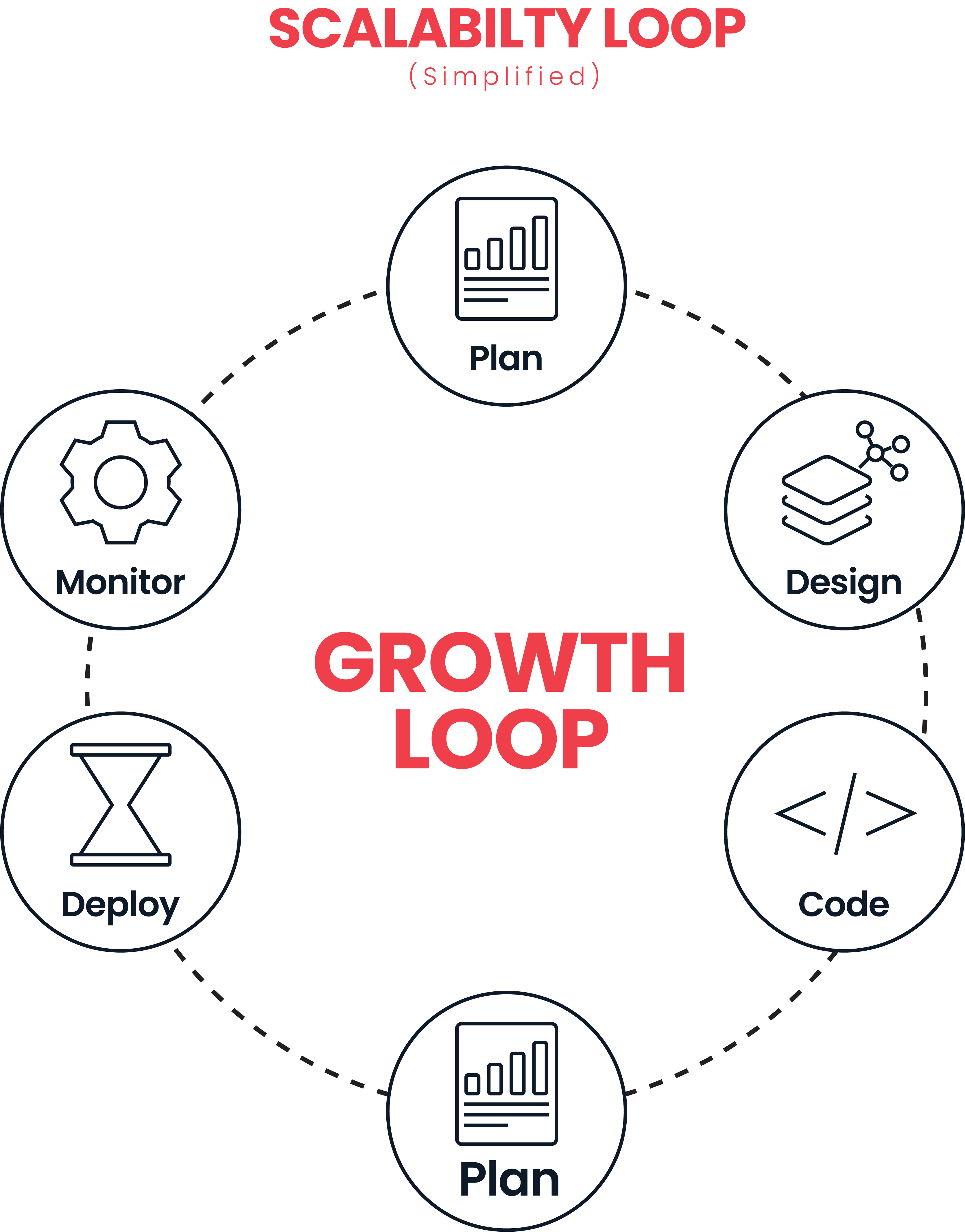
Optimization is an ongoing process. Teams run controlled experiments, adjust resource allocation, and refine caching or scaling strategies based on real data.
Feedback loops connect monitoring results with development and deployment workflows. This keeps the system aligned with scalability goals and ensures efficient use of cloud infrastructure over time.
How Do You Manage Scalability, Governance, and Cost Optimization?
This step focuses on controlling infrastructure usage, balancing performance with cost, and ensuring efficient scaling decisions across cloud computing.
Infrastructure Cost Monitoring
Teams track spending across compute, storage, and network resources. This includes monitoring usage patterns and identifying areas where costs increase with traffic growth. Tools within cloud platforms help map cost directly to system components.
Resource Usage Optimization
Efficient systems use only the resources they need. Teams analyze CPU, memory, and storage usage to remove waste. Optimization improves application performance while keeping infrastructure efficient in distributed systems.
Scaling Policy Definition
Scaling policies define how the system responds to changes in demand. Teams configure rules for auto-scaling based on traffic, load, or resource usage. This supports horizontal scaling and maintains high availability without manual intervention.
Performance Cost Tradeoffs
Scenario
Performance Impact
Cost Impact
Decision Focus
High compute allocation
Faster response time
Higher infrastructure cost
Used for critical services
Aggressive auto scaling
Handles traffic spikes well
Increased short-term cost
Ensures availability
Heavy caching usage
Reduced database load
Lower computing cost
Improves efficiency
Minimal resource usage
Lower cost
Risk of latency increase
Suitable for low traffic
This comparison helps teams balance performance with cost instead of overallocating resources.
Capacity Planning Reviews
Teams review system capacity regularly based on real usage data. This includes analyzing traffic trends, system limits, and infrastructure performance. Capacity planning ensures systems remain stable as demand grows while keeping costs under control.
Conclusion
A solid software development process makes scaling feel manageable, not stressful. When each step is handled the right way, your system grows without breaking. Keep an eye on performance, adjust when needed, and you’ll stay ahead as demand increases.
Key FAQ’s
How do I know if my application is ready to scale?
If your system handles increasing numbers of users with stable performance and consistent response times, it shows strong scalability readiness. Monitoring key metrics helps confirm how well it supports growth.
Do I need microservices to build a scalable application?
A modular approach supports scalability effectively. Many systems begin with a modular monolith and evolve over time, allowing flexibility while maintaining strong system architecture and performance.
What helps ensure scalability in a growing application?
Planning scalability early in the software development process helps systems handle growth smoothly. Clear architecture, performance tracking, and continuous optimization support efficient scaling.
How often should scalability be tested?
Regular scalability testing during development and before releases keeps performance stable. Continuous testing ensures the system adapts well to increasing traffic and usage patterns.
Is cloud computing necessary for scalability?
Cloud computing supports scalability through flexible resources and auto-scaling. It allows systems to adjust based on demand while maintaining performance and efficient resource usage.
Muhammad Shayan Ahmad, Solution Architect and Sr Software Engineer at CodeFulcrum, bringing over 7+ years of expertise in AI-powered software architecture, full-stack innovation, and emerging technologies.